|
|
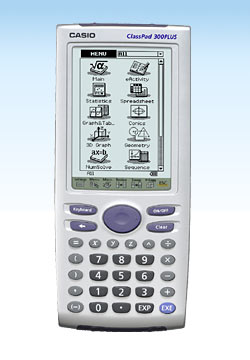

เครื่องคิดเลข คาสิโอ ClassPad 300 PLUS
( ตอนนี้มี Classpad 330 มาแทนแล้วครับ หน้าจอสว่างขึ้น พร้อมฟังก์ชันเพิ่มเติมอีกเพียบ ) อุปกรณ์ที่มีในชุด เครื่องคิดเลข + ถ่าน AAA 4 ก้อน + สายลิงค์ 2 เส้น แบบเครื่องกับเครื่อง และแบบเครื่องกับคอม + manual ภาษาอังกฤษ ในรูปแผ่นซีดี ** update ล่าสุด Classpad 300 , Classpad 300 plus , Classpad 330 , Classpad 330-A ทั้งหมดเลิกผลิตแล้วครับ ออกมาเป็นล่าสุด 6/2/53 รุ่น Classpad 330 (OS version 3.04) รายละเอียด - การคำนวณทางพีชคณิต, เลขาคณิต, ตรีโกณมิติ, แคลคูลัส, แคลคูลัสชั้นสูง, สถิติ, ฟิสิกส์, และวิศวกรรม - หน้าจอขนาดใหญ่ 160x240 ด็อท(แบบ LCD) - ใช้ปากกาสัมผัสหน้าจอ, มีเมนูและปุ่มกดให้เลือกคล้ายกับการใช้งานจากคอมพิวเตอร์, สามารถ "Drag & drop" ได้ - CAS (Computer Algebra System) แสดงการนำเข้าข้อมูลผ่านหน้าจอ, เศษส่วน, อนุพันธ์, อินทิเกรท, การคำนวณลิมิต, ฯลฯ - การแปลงฟังก์ชัน - ตัวช่วยทางพีชคณิต(Algebra Assistant) - eActivity Application Creation (ปุ่มสำหรับประมวลผลประโยคทางคณิตศาสตร์, ปุ่มสำหรับเรียกโปรแกรมที่ถูกสร้างโดยผู้ใช้กลับคืนมาได้) - การใช้งานในชั้นเรียน (มี "digital text book", อนุญาตให้ปรับเปลี่ยนตามความเหมาะสมในแต่ละชั้นเรียน, การเชื่อมต่อระหว่างอุปกรณ์ที่หลากหลาย) - การแสดงต่อบุคคลอื่นๆ (หน้าจอแสดงผลย้อนกลับได้คล้าย Slideshow ใน Powerpoint, รูปแบบการแสดงผลที่เป็นธรรมชาติ, เลือกแสดงได้ทั้งแบบอัตโนมัติ หรือแบบทำเอง) - การวาดกราฟ(เรขาคณิตแบบมีเงื่อนไข (Constraint geometry), วาดกราฟเรขาคณิต(triangle, polygon, circle, ฯลฯ), การวิเคราะห์เรขาคณิต(angle, length), และเอนิเมชัน) - การวาดกราฟแบบ 3 มิติ(ซูม, หมุนเปลี่ยนมุม, การ Trace) - การใช้งาน SpreadSheet (คล้ายใน Excel โดยสามารถกำหนดสูตร, วาดเส้น, กราฟแท่ง, ชาร์ทแบบพาย, Scatter) สิ่งที่เพิ่มเข้ามาใหม่ใน Classpad 300 PLUS: - ระบบปฏิบัติการเวอร์ชั่นใหม่ (Classpad OS Version 2.2) - Flash memory ขนาดใหญ่ขึ้น จาก 4.0 MB ใน Classpad 300 มาเป็น 5.4 MB ใน Classpad 300 PLUS - ทำการติดตั้งโปรแกรม Add-in ที่ชื่อ Spreadsheet มาให้เลยในตัวเครื่อง - หน้าจอแสดงผลชัดเจนขึ้น + สามารถกำหนดตัวอักษรเป็นแบบหนา(Bold) หรือแบบปกติ(Regular) ได้ ดูรายละเอียดเพิ่มเติมที่
http://edu.casio.com/products/classpad/cp_v220/
-------------------------------------------------------------------------------------------------------------------------Classpad 300 Plus Features overview: Mathematical learning pad with extra-large touchscreen display and pen operation Ideal for upper classes at grammar school and for university Intuitive operation thanks to user menu (similar to computer) 512 kB RAM/4 MB flash ROM memory/52-value variables memory Add-ins/additional calculator applications Extensive mathematical applications (e.g. CAS, polynomial equations of a higher degree, recursive number sequences) Extended graphic representations (e.g. zoom, trace function, conics mode, 3D graphics) Dynamic geometry software Trigonometry, statistics, differential and integral calculus Formula memory, interactive equation solver, user-defined programming Slide show presentation eActivity menu with which all applications can be functionally linked Additional devices available Data exchange with other devices and with the PC possible Functions & general information: General information: Memory capacity: 512 kB User RAM and 5.3 MB Flash Flash-ROM?memory Add-in communication and add-in version (application and OS updates) via Flash-ROM Large black-and-white LCD display with 160 x 240 pixel (digital) stylus operation using a touch screen split screen for the use of various editing functions such as drag&drop, copy&paste, etc. that are operated with the stylus virtual keyboard with mathematical functions, letter keypad, special symbols and a selection list of all available commands Natural mathematical writing style Selection of preset mathematical expressions for inputting coefficients Symbol menu for selecting the mode Included in delivery: interfaces with the computer via USB cable and ClassPad to ClassPad via a 3-pin cable that is included, batteries, 180-day demo version of the "ClassPad Manager" software Dimensions (H x W x D): approx. 27.5 x 84 x 199.5 mm Weight: approx. 280 g inc. batteries Power supply: 4 x AAA Functions: Numerical and algebraic calculation: Calculation of fractions with a "one-touch" conversion between fractional and decimal display Access to all mathematical functions such as vx, xy, log x, ex, etc. using the virtual keyboard for numerical and algebraic calculations Calculates in degree and radian measure Algebraic calculation with commands such as factor, expand, simplify, approx, combine, collect, etc. Calculates with complex numbers converts between sexagesimal and decimal Random number generator, permutation, combinational logic Vector calculation: calculates the scalar and cross product Matrices calculation: creates matrices in a mathematical representation, adds rows and/or columns, determinants, transposition, eigenvector, eigenvalue E-activities: E-activities can be used by the teacher as a documentation tool for electronic examples and practical problems with accompanying text, mathematical formulae, 2D and 3D graphics, geometric drawing, dynamic geometry operations and tables. E-activities can also operate and be used as a "workbook" for students, so they can investigate problems and document their learning successes, or to solve problems using instructions or by entering notes and then to store their work in a file. E-activities thus bring together lines of text and calculations, dynamic geometry operation and all application menus like a written task in a standard textbook: descriptive text, using all applications by adding labelled "link strips" and dynamic geometry operations and additional note functions. Statistics (based on lists): (two-dimensional) descriptive statistics for calculating average values, standard deviations, estimated values etc. Regression analyses: linear, quadratic, cubic, quartial, log., exp., power, sinus and logistical Regression with graphical display of statistical data and regression graphs (two-dimensional) comparative statistics for calculating probabilities such as normal, binomial, Poisson distribution, various test processes such as è'-, Z-, t-Tests and intervals Graphics and tables: Graphical displays of Cartesian, polar, parametric functions and inequalities Graphical analysis with trace, plot (stretch, text, tangents, normals, circle etc.), zoom functions and manual movement of the graphics window Graphical determining and resolving zeroes, maximum, minimum, points of intersection, points of inflection (curve discussion) Modifying graphics Generating value tables based on function terms that are entered Generating synoptical tables with derivative values based on function terms that are entered Numerical progressions: Recursive displays of numerical progressions: ordered number pairs, arithmetic and geometric numerical progressions, progression of differences, Fibonacci Selection of table types, the automatic difference, calculating the quotient and/or total of the following terms (simplifies the definition of a numerical progression) Graphical display of recurrences Calculating the partial total sequence Conic sections: Graphic display of circle, parabola, ellipse and hyperbola equations Preset forms of conic sections for the simple and rapid input of equations Graphic determination of focal points, vertices, guidelines, symmetrical axes or centre point, radius, asymptotes and numerical eccentricity 3D graphics: three-dimensional graphical display of functions in the form of z = f (x,y) Selection of the visual angle for a view from the direction of 3 different axes Manually rotating the graphic by pen-touch Automatically rotating to the left, right, up or down Reading off the graphics coordinates using the trace function Dynamic geometry: Drawing and analysing geometric figures: drawing points, straight lines, polygons, n-vertices, circles, ellipses, function curves, parallelograms, rectangles, deltoids, etc. , in order to process or move them in many different ways Measuring and changing information on the coordinates of a point, the length and the gradient of a straight line, the size of an angle etc. Construction tools for drawing perpendicular bisectors, normals, bisectors of an angle, centre points, points of intersection, tangents on a curve, and also for converting, rotating, mirroring, stretching or transforming figures Animation function for observing the changes in figures in conjunction with specific conditions Exchanging measured data with other applications, such as numerical / algebraic calculations (simple by means of drag&drop in the split screen) Solving equations numerically: Solving equations numerically using Newtonian methods Determining the value of a given variable Transferring formula terms and equations from other applications (simple by means of drag&drop in the split screen) Presenting: Creating screenshots for OHP presentations in the classroom Using desired screenshots to create a presentation using the hard-copy function Inserting empty pages (white screen) Using tools such as shift, delete, copy or insert pages, insert text, draw a line, an arrow, using the eraser choosing between playback in manual or automatic mode Programming: Inputting and processing programs using a program editor Using various program commands via pop-up selection or catalogue function Using graphics functions, conic section equations, 3D graphics functions, graphic and table functions (also for numerical progressions) as well as statistical graphics and calculations is possible Communication: Data can be exchanged with another ClassPad using the 3-pin cable that is supplied Data can be exchanged with the computer using the USB cable that is supplied Data can be transferred to the EA-200 data analysis equipment The display contents can be projected using the optional overhead set System settings: Configuring all settings Managing variables Managing files User language can be selected Contrast of the screen display Power consumption / automatic switch off Key format Choice of image for the final screen View of the application versions View of memory usage for the main memory, add-in applications, e-Activities and language ดูรายละเอียดเพิ่มเติมที่ http://edu.casio.com/products/classpad/cp_v220/
//////////////////////////////////////////////
www.mrfinance.org
>>>> MRfinance ขายและให้เช่าเครื่องคิดเลขทางการเงิน และเครื่องคิดเลขวิทยาศาสตร์ กราฟฟิก และแบบกระดาษพิมพ์ รุ่นยอดนิยมเช่น Casio FC 200V ,Texas Intrument Ti BA 2 Plus ( Pro) , FX 5500 LA , FX 9860G SD , CFX 9850GC PLUS , Algebra FX 2.0 PLUS ราคาพิเศษสำหรับนักศึกษาใช้ได้ทั้งคณะ MBA , วิศวกรรม ,บริหาร , BBA , วิทยาศาสตร์ , เศรษฐศาสตร์ , สถิติ ,บัญชี MRfinance เราคือบริษัทนำเข้า และเป็นตัวแทนจำหน่าย เครื่องคิดเลขทางการเงิน เครื่องคิดเลขวิทยาศาสตร์ กราฟฟิก และแบบกระดาษพิมพ์ มีบริการทั้งขายปลีก ขายส่งให้กับสถาบันชั้นนำ และตัวแทนต่างๆทั่วประเทศ และยังมีบริการให้เช่าด้วย ผลิตภัณฑ์ของเรามีมากมายหลายรุ่นดังเช่น Algebra FX 2.0 PLUS ,CFX 9850GB Plus ,CFX 9850GC Plus ,ClassPad 300 ,ClassPad 300 Plus ,FX 115MS ,FX 350 MS ,FX 350ES ,FX 3600P ,FX 3600PV ,FX 3650P ,FX 3800P ,FX 3950P ,FX 4500PA ,FX 5000F ,FX 5500LA ,FX 570ES ,FX 570MS ,FX 5800P ,FX 6300G ,FX 7400G Plus ,FX 82ES ,FX 9750G ,FX 9750G Plus ,FX 9860G SD ,FX 991 ES ,FX 991 MS ,FX 9950GB Plus ,Sharp EL506W-BK ,Texas TI 83 Plus ,(Texas Intrument) TI BA 2 Plus ,CFX 9850GC Plus ,FC 100V ,FC 200 ,FC 200V ,HP 12 C (Platinum) ,Ti BA 2 Plus (ProFessional) ,CASIO DR 120 LB ,CASIO DR 240 HT ,CASIO FR 2650 DT ,DR 140L ,HR 100TE
** ราคาข้างต้นไม่รวมค่าจัดส่ง**
** ขอสงวนสิทธิ์ในการเปลี่ยนแปลงราคา โดยมิต้องแจ้งให้ทราบล่วงหน้า กรณีต้องการข้อมูลล่าสุดโปรดโทรเช็ค MRfinance หรือที่ www.mrfinance.org
** - สินค้าทุกชิ้นจากเรา รับรองคุณภาพเครื่องใหม่ ของแท้ ( เบิกห้าง) 100% รับรองคุณภาพโดย MRfinance รับประกัน 1 ปี - ปรึกษาการใช้งานเครื่องคิดเลขการเงิน และส่วนวิชาการเงินฟรี ( ด้วยผู้รู้จริง (คือผม) ดีกรี MBA Finance)
---------- สำหรับนักศึกษาบริหารธุรกิจ หรืออื่นๆ ที่ต้องการใช้ระยะสั้นๆ เพื่อสอบ Stat วิศวะ หรือ Finance หรือ CFA CISA เราจัดให้โดยมีบริการให้เช่า ราคาถูก พร้อมรับสิทธิพิเศษ เฉกเช่น ผู้ซื้อสินค้าข้างต้นทุกประการ
สนใจติดต่อ MRfinance ( หน่อง ) 081-6677876


www.mrfinance.org
( ทุกที่ ทุกเวลา เพียงคุณโทรมา )